
Node-graph audio middleware for Unity

Sources, effects, modulation, and logic go on one canvas, and what you build there is what the game plays.
A graph is a project asset like any other, authored in a window beside your scene and stored
with the rest of your work. A playing Sound Graph is an ordinary AudioSource, so
mixer routing, pausing, and everything else you already know about Unity audio still works, in
the editor and in the build alike.
Drop in sources, effects, modulation, and logic, and wire them together across audio, values, and triggers. Package any chain as a Sub Graph and reuse it anywhere.
Play the graph from its own window without entering Play mode. While it runs, nodes show their live values, active voices, and output levels.
Change the graph while it plays, in audition or in Play mode, and the change is audible straight away, so you tune against what you are hearing rather than stopping and starting over.
A tour of what is on the canvas. The complete node list is further down.

An idling engine that never loaded an audio file. A loop that stops by jumping to its own tail and ringing out, instead of fading under the next thing.
- Oscillator · Noise · Impulse - sound with no files
- Wave Player - poly or cut, up to 8 voices
- Loop regions with power-warped crossfades
- Tail Start - a musical end to stop into
- Sample Sets - weighted, shuffled, round robin
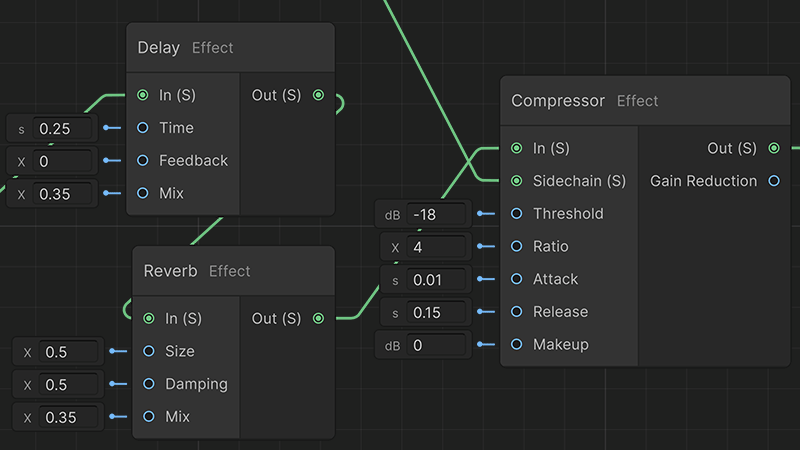
One gunshot, popping across a field and cracking off concrete in a stairwell. The space is a parameter, so the same asset covers both.
- Filter - LP, HP, BP, resonant
- Delay · Reverb · Chorus · Flanger · Phaser
- Compressor with sidechain input
- Limiter · Parametric EQ · Crossover
- Shaper - tanh, hard clip, fold
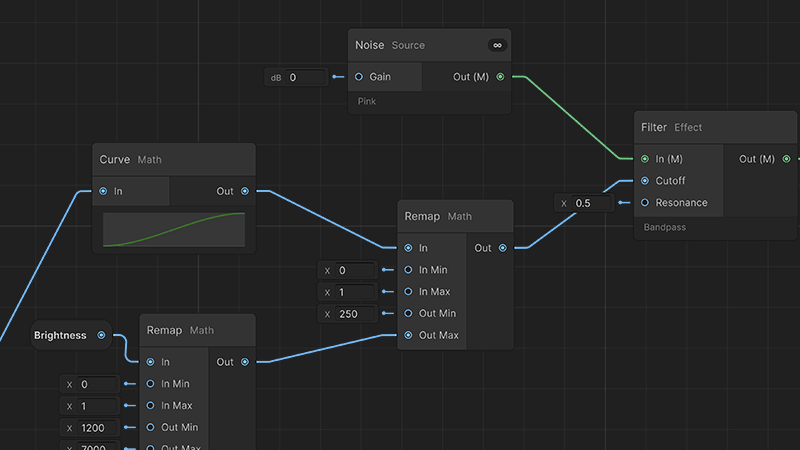
An engine that spins up, strains under load, and coasts back down, driven by one float your game already tracks.
- ADSR · LFO - sine, tri, saw, square, random, drift
- Envelope Follower · Sample & Hold
- Math (20 ops), Remap, Curve, Slew
- Compare · Gate · Index Switch
- Trigger routing, repeat, probability
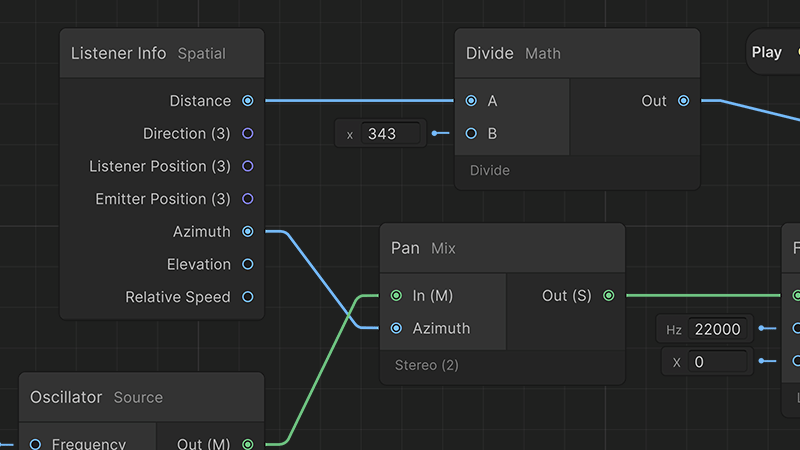
Let distance open a filter as well as lower a volume. Angle, elevation, and closing speed arrive as values on the canvas, free to drive anything you wire them into.
- Listener Info - distance, azimuth, elevation
- Relative speed and positions
- Pan - constant power, up to 7.1
- Doppler with configurable speed of sound
- Custom falloff curves, per sound
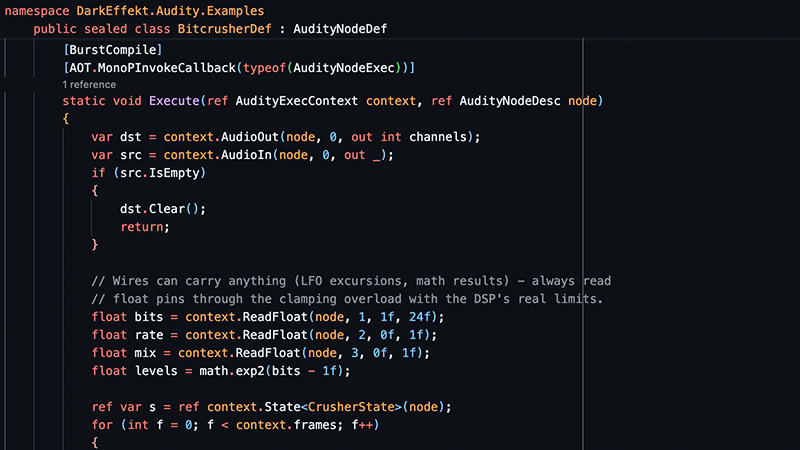
A hundred shell casings for the cost of one sound. Write your own DSP node in C# and it appears in the create menu beside the built-in ones.
- Batch Groups for dense trigger bursts
- Runtime Sample Set banks
- In-Memory / Streamed / Paged tiers
- Sub Graphs you can nest and reuse
- Custom nodes written in C#
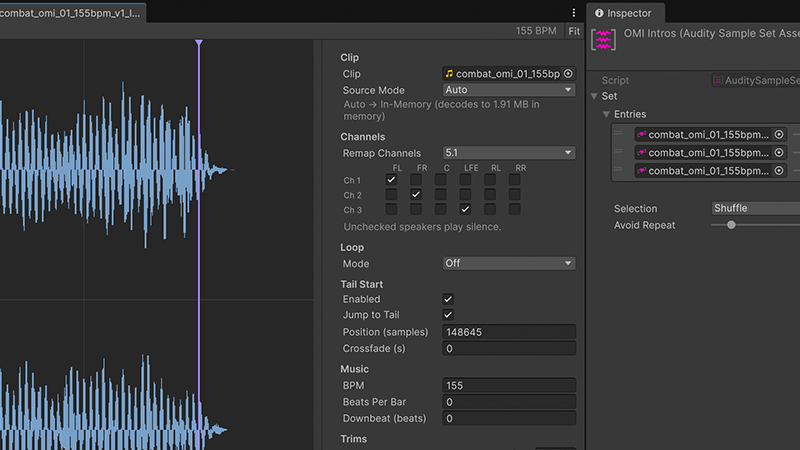
Sounds that land on the beat however late they are asked to start. Every instance reads the same grid, so one that joins in late still arrives in phase.
- Sample-accurate grids off the DSP clock
- Quantize - beat, bar, phrase
- Tempo and loop points read from WAV and AIFF
- Shared transports across sources
An AnimationEvent fires a trigger, a Sample Set picks a take you didn't just hear, and a Switch Route driven by a surface enum sends it down the right chain.
A single Wave Player feeds a filtered, non-spatial radio chain and a graph-spatialized dry chain at the same time. Both read the same source, so the two can never drift apart.
A cue waits and lands sample-exactly on the next bar, no matter how late it is asked to start. A transport is anchor math on the DSP clock rather than an accumulated count, and it keeps advancing while nothing is playing, so a late cue lands on the same grid as everything else.
A Batch Group collapses a burst of shard sounds into one composite played at their centroid, feeding the number of triggers it swallowed to a parameter you nominate on the composite graph. It decides whether a play happens at all, so it adds nothing to the audio thread.
Per-instance DSP load and render time, plus a per-node cost table that tells you which part of a graph is expensive. Record a session and save it as a JSON trace to open in Perfetto.
An Audity module in Unity's Profiler window: DSP load, render µs, peak block, active voices,
and paged pool. Works in development players and in captured .raw files.
Compiles every Sound Graph in the project and writes a table of where memory goes per graph: baked PCM, paged pools, and streamed clips, counted per playing instance. The Wave Player node shows the same paged numbers in the graph.
Bounce any graph to disk, multichannel and faster than realtime. Takes re-roll the graph's random choices into a folder of variations, and Lock Seed pins them so a bounce reproduces exactly.
An Audity track with quantized clip starts and ease handles as fades, retroactive trigger markers, and a bridge that drives graph parameters from ordinary AnimationClips and Animator Controller parameters.
Six editor tools an AI assistant can call to find, describe, validate, create, edit, and bounce graphs, plus a node catalog to build them from. Writes support a dry run and pass the same validation as the graph editor. They publish themselves to Unity Assistant (MCP) or the Unity CLI when present, and stay dormant otherwise.
Everything in the package, listed. The cards above link into it.
Sources
4 NODES- Wave Player
- Plays a Sample or Sample Set. Poly or Cut, up to 8 voices, launch quantize, per-voice pitch and gain, stop fade, and a Chain mode that requeues itself.
- Oscillator
- Saw, square, and triangle, band-limited with PolyBLEP, plus sine. Frequency, pulse width, phase offset, and a sync trigger.
- Noise
- White, pink, brown, or blue, with gain and a per-node seed.
- Impulse
- Sparse random clicks. Density in impulses per second, and a variation control that runs from an even bed to crackle.
Mix
7 NODES- Mixer
- Any number of inputs, each with its own gain in dB.
- Gain
- Level in dB.
- VCA
- Audio multiplied by a float for linear amplitude control.
- Crossfade
- A/B blend under an equal-power or linear law.
- Pan
- Constant-power mono to stereo, quad, 5.0, 5.1, or 7.1, by azimuth.
- Stereo Width
- Mid/side width from 0 to 2 on the front pair. Mono passes through; surround keeps center and LFE.
- Layer Mixer
- Any number of stems, each with a curve mapping one input value to its gain, and a smoothing time.
Effects
16 NODES- Filter
- One-pole lowpass, or resonant state-variable lowpass, highpass, and bandpass. Cutoff and resonance.
- Delay
- Time, feedback, mix, and a max time that sizes the line.
- Reverb
- Size, damping, and mix.
- Compressor
- Threshold, ratio, attack, release, makeup, a sidechain input, and a gain-reduction output.
- Limiter
- Ceiling and release.
- Parametric EQ
- Peak, low shelf, or high shelf, with frequency, gain, and Q.
- Shaper
- Tanh, hard clip, or fold, with drive, mix, and input and output gain.
- Chorus
- Rate, depth, and mix across two swept taps with a per-channel offset.
- Flanger
- Rate, depth, bipolar feedback, and mix.
- Phaser
- Rate, depth, bipolar feedback, and mix.
- Comb Filter
- Tuned delay by frequency, with bipolar feedback and mix.
- Ring Modulator
- An optional carrier input, an internal carrier frequency, and mix.
- Noise Gate
- Threshold, attack, hold, release, and floor, plus an Open float output.
- Transient Shaper
- Attack and sustain from -1 to 1 off differential envelopes, with no threshold to set.
- Pitch Shifter
- Up to 24 semitones either way, with mix. Fades to dry at unity.
- Crossover
- One frequency into Low and High audio outputs. Linkwitz-Riley, and the two sum flat.
Channels
6 NODES- Split / Join
- A layout out to N mono pins, and N mono pins back into a layout.
- Take Channel
- One channel out of a wider signal, by index.
- Swap
- Swaps a stereo pair.
- Mono → Stereo
- Widens a mono signal to a stereo pair.
- Stereo → Mono
- Folds down by equal power, average, or sum.
- Channel handling
- Channel count is the layout. Widths propagate exactly, with no hidden up or downmix, and the Output node sets the layout the graph puts on the wire.
Modulation, math, and values
15 NODES- ADSR
- Attack, decay, sustain, and release, with trigger and release pins.
- LFO
- Sine, triangle, saw, square, random, and drift. Random steps and holds; drift wanders smoothly. Frequency, depth, offset, and seed.
- Envelope Follower
- Peak or RMS detection with attack and release, out to both linear and dB.
- Sample & Hold
- Latches a value of any width on a trigger, following the input until the first one arrives.
- Spectrum Analyzer
- Two to eight bands across a low and high frequency, peak or RMS, linear or dB, out as an array of levels your game can read.
- Math
- 20 operations, from add through lerp, dB and linear conversion, and semitone ratios.
- Remap
- Input and output ranges, all of them modulatable, with an optional clamp.
- Curve
- An AnimationCurve, its key range setting the input window.
- Slew
- Separate rise and fall limits per second, where 0 means unlimited.
- Constant
- Float, vector (width 2 to 4), bool, and enum bound to one of your own [AudityEnum] types.
- Random Value
- Min and max with a roll trigger and a held output.
- Time
- The instance's game rate (Time.timeScale) plus session and play clocks, fed by the engine.
Logic, triggers, and timing
13 NODES- Compare
- Six operations with a tolerance, out to a float result and onTrue / onFalse triggers.
- Index Switch
- Variadic float inputs selected by index.
- Gate
- Passes triggers while its open input sits at or above 0.5.
- Quantize
- Holds a trigger to the next beat, bar, or phrase, or lets it through immediately.
- Switch Route
- Routes one trigger to N outputs by a value, labeled from the driving enum or bool.
- Random Route
- N outputs with per-output weights, an anti-repeat window, a shuffle bag, and a picked-index output.
- Trigger Repeat
- Fires on a period, with start and stop.
- Trigger Delay
- Delays a trigger by a number of seconds.
- Sequence Step
- N steps that stop or loop at the end, with a reset.
- Trigger Any
- An explicit N-input OR junction.
- Trigger Probability
- Passes a trigger with a probability from 0 to 1.
- Trigger Rate Limit
- Enforces a minimum interval between triggers.
- State Route
- Named rows with an exit grid, its own BPM and beats per bar, and sparse from/to/when/bridge rules that each get an output pin, plus enter, exit, arrive, and depart pins and current and next outputs.
Spatial and vector
6 NODES- Listener Info
- Distance, direction, listener and emitter positions, azimuth, elevation, and relative speed, pushed per frame by the engine only when a graph asks for them.
- Doppler
- Closing speed, an exaggeration scale, and a speed of sound, out to a ratio and to semitones.
- Combine XYZ / Separate XYZ
- Pack and unpack vectors of width 2 to 4.
- Vector Math
- Length, distance, dot, cross, and normalize.
- Index
- Picks one value out of an array, clamping at the ends. The tap for a Spectrum Analyzer.
Samples and Sample Sets
- Sample asset
- Gain and pitch trim, loop mode and region, loop crossfade with a power curve, Tail Start with a jump-in crossfade, musical BPM, beats per bar and downbeat, and a per-clip speaker remap matrix.
- Waveform view
- Handles for loop start and end, the crossfade grip, the downbeat, and Tail Start, with beat-grid snapping when a BPM is set and zero-crossing snapping when it is not. Shift bypasses snapping mid-drag.
- Sample Editor window
- Per-channel stacked lanes, wheel zoom at the cursor, drag-pan, and Fit, with the settings form embedded.
- Audition
- A real preview honoring loops, Tail Start, and crossfades, with a playhead line tracking the position in the waveform.
- DAW metadata
- Tempo and loop points are read from the source file at import: the acid and smpl chunks in WAV, and Apple Loops tempo in AIFF and AIFC. Tempo can also be read off the filename.
- Sample Sets
- Weighted entries picked at random, shuffled, or round robin, with an anti-repeat window up to 8. Shareable as an asset or inline on a Wave Player.
- Source mode
- How the Sample feeds the graph: In-Memory, Paged, or Streamed, set per Sample and separate from the clip's own Unity import settings. Auto chooses per clip and warns when one cannot support what the graph asks of it.
Scripting and extension
- Playback
- Play with a fade, PlayQuantized to a grid, Stop with a fade, and a per-call content argument for dialogue-style selection.
- Parameters
- SetParameter, SetFloat, SetBool, SetInt, and SetVector. Values are sticky per source and reapplied on every Play, with authored glide and aliases.
- Read-back
- Out members let the graph write values your game reads through TryGetFloat, GetFloat, and TryGetVector, plus a TriggerFired event. Roughly 60 Hz, one frame old, and free when a graph declares no Out members.
- Triggers
- Anonymous or named, by id, and all of them quantizable.
- Transports
- SetTempo per instance, and AudityGlobal for shared named transports, boundary queries, and global parameters.
- Banks
- AudityBank loads Sample Sets or objects to a handle, deduplicated by content hash, with a cold-bind policy for content that is not ready yet.
- AudityPlayback
- Component-free pooled one-shots at a position, with quantize, fade-in, and an explicit mixer group.
- AudityBeats
- Main-thread Beat and Bar events per transport.
- AudityTelemetry
- An opt-in sink for node meters, the parameter stream, per-voice playback positions, and per-node timings. Costs nothing when unset.
- Custom nodes
- Register your own Burst DSP nodes, voice players, and IAudioGenerator sources from a plain project assembly. No package edits and no internals access; they appear in the create menu and inspectors with no editor code.
- Sub Graphs
- Nest to any depth, create one from a selection, pin or wire each placement input, and unpack a child back into its parent.
- Batch Groups
- Coalesce dense trigger bursts into one composite at the centroid, with a max instance count, radius, cooldown, and an overflow policy. Main-thread policy, so it adds no DSP.
How it runs
- One compiled program
- A graph becomes a single program of up to 256 nodes, dispatched in one pass over the node table per block.
- Burst
- That program is Burst-compiled, and the audio thread never allocates.
- Scriptable Audio Pipeline
- Unity 6000.5 introduced the Scriptable Audio Pipeline: audio generated in code, at the source, as a first-class part of the audio graph. Audity compiles to a generator on it, so a Sound Graph is a real audio source rather than a script pushing buffers at one.
- Deterministic
- Random number generation is seeded per asset, so the variation you approved is the variation that ships, and an update does not change what an existing graph renders.
- Editor equals build
- The same engine renders an audition in the editor and the sound in a player.
- Platforms
- Windows, macOS, and Linux on the desktop, iOS and Android under IL2CPP. WebGL is not supported: the pipeline has no audio-thread generator path there.
Where it sits in Unity
- One property
- Audity writes exactly one thing on its AudioSource: the generator slot. Volume, mute, pitch, stereo pan, spatial blend, 3D settings, and mixer routing all keep working.
- Components optional
- Drop a Sound Graph straight into an AudioSource generator slot and it plays. An Audity Source alongside it adopts that graph and layers overrides, batching, and quantized starts on top.
- The mixer is the bus tree
- Audity adds no bus system, deliberately. Sources route into AudioMixer groups like any other, so category volumes, ducking, and snapshots work as they always have.
- One spatializer at a time
- Position a sound with Unity 3D or with spatial nodes in the graph. Doing both places it twice, so the output is panned and attenuated twice over.
- One listener
- The scene Audio Listener stays authoritative. The graph's Listener Info node reads that same listener.
- Editor matches build
- A graph auditions in the editor through the same engine that renders it in a player.
Working in the editor
- Audition without Play mode
- The graph window plays the whole graph where it sits. Stop ends it on a short fade, and a trigger button fires an external Trigger In so a graph that waits for input can still be tested.
- Live badges
- While a graph auditions, its nodes read out of the running instance: a Parameter In shows its current value, a Wave Player its active voice count, the Output a peak meter. Sub Graph windows light up with the same badges, and name the graph being played.
- Live reload in Play mode
- Editing a Sound Graph while the game runs reaches every source currently playing it, so the edit is audible straight away. On by default. A value edit is adopted with the DSP state intact, so phases, playheads, and tails carry; a structural edit restarts the instance.
- Live parameters from code
- SetParameter reaches the playing instance immediately and smooths over the member's authored glide. Allocation-free and safe to call every frame.
- Sticky values
- A parameter set once is remembered by the source and reapplied to every future Play, so setting one before the first Play is fine.
- Transport-accurate audition
- Auditioning a graph that drives a transport anchors the musical grid exactly as a real Play would, so tempo-locked material sounds the same as it will in game.
Tooling and diagnostics
- Activity Monitor
- Per-instance DSP load, render time, and peak, with a per-node cost table, and a record button that saves a JSON trace you open in Perfetto.
- Profiler module
- An Audity module in Unity's Profiler window covering DSP load, render µs, peak block, and active voices. Works in development players and in captured .raw files.
- Memory report
- Compiles every Sound Graph in the project and breaks memory down per graph, including paged-pool sizing. The Wave Player node also shows a live estimate in the graph.
- Bounce to WAV
- Renders a graph offline, faster than realtime and without entering Play mode, at the authored Output layout. Take counts re-roll the random choices, Lock Seed pins them, and it writes 44.1, 48, or 96 kHz at 16 or 24-bit PCM or 32-bit float.
- Timeline
- An Audity track whose clips play a source, with quantized starts and the clip ease handles as the fades, a transport track, and trigger markers.
- Animation bridge
- Drives graph parameters and triggers from ordinary AnimationClips and Animator Controller parameters.
- Agent tools
- Six editor tools an AI assistant can call to find, describe, validate, create, edit, and bounce graphs, plus a node catalog to build them from. Writes support a dry run, and edits go through the same validation as the graph editor. They publish themselves to Unity Assistant (MCP) or the Unity CLI when either is present, and stay dormant otherwise.
In the box
- Quick Start
- One scene, two Sound Graphs, and five audio files. An ambient bed on enable, and a laser that draws from a four-clip pool and rolls a fresh pitch per shot.
- Alien Hovercraft
- A drivable craft with no audio files at all. The drive is synthesized live by a Sound Graph shaped by six numbers the vehicle hands it, and the graph's own output level comes back out as the hull glow.
- Custom Nodes
- Node extension from a plain project assembly: a Burst DSP effect, a custom voice player, and an IAudioGenerator source.
- Manual
- Fifteen chapters, from installation and a quick start through the node reference, spatial audio, musical timing, scripting, performance, extending Audity, and how it sits alongside Unity audio.